

Download YOU DJ app – Free DJ Mixing Software for Windows, Mac, Android & iOS
Overview of YOU DJ – A Free Tool for Music Makers
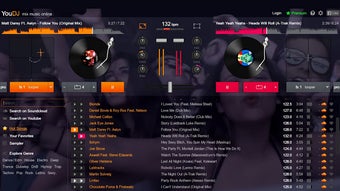
YOU DJ is a free, cross‑platform application built especially for budding DJs and music makers who want to craft professional‑sounding mixes without a steep learning curve. The software packs a surprisingly rich toolbox—auto‑mix, scratch effects, looping, and a library of sound‑effects—that lets users add a fresh spin to any track. Whether you’re preparing a set for a house party, a club gig, or simply experimenting in your bedroom studio, YOU DJ offers an intuitive interface that lets you focus on creativity rather than technical hassle.
One of its standout qualities is the seamless integration with popular music‑sharing platforms such as SoundCloud, allowing you to publish your mixes directly from the app. The fact that it is offered completely free makes it an attractive entry point for beginners and a handy side‑tool for seasoned DJs who need a quick, reliable mixer on the go. With regular updates that improve stability and introduce new effects, YOU DJ remains a secure and up‑to‑date solution for anyone looking to dive into DJing without spending a dime.
Key Features that Make YOU DJ Stand Out
- Auto‑Mix Engine: Let the algorithm blend tracks based on BPM and key, perfect for effortless transitions.
- Scratch & Loop Controls: Add classic vinyl scratching or create custom loops with a single tap.
- Built‑in Sound Effects: Choose from a library of reverb, echo, flanger, and more to spice up your mixes.
- One‑Click Sharing: Export directly to SoundCloud, YouTube, or save locally for offline playback.
- Cross‑Platform Compatibility: Available on Windows, macOS, Android, and iOS, ensuring you can DJ anywhere.
- Customizable UI Themes: Switch between dark and light modes and rearrange decks to suit your workflow.
- Playlist Management: Import playlists from iTunes, Spotify (local files only), or manually build your own.
- Real‑time Waveform Visualizer: See beats and peaks instantly, making cue points easier to set.
Beyond the listed features, YOU DJ continuously evolves through free updates that add new effects, improve latency handling, and refine the auto‑mix algorithm. The developers have placed a strong emphasis on security; the app is signed with a valid certificate and distributed via reputable download portals, ensuring that the installation package is free from malware. For newcomers, the presence of tutorial pop‑ups and a dedicated help center reduces the learning curve dramatically. Even if you are already familiar with industry‑standard tools like Serato or Traktor, YOU DJ can serve as a lightweight companion for quick mashups or on‑the‑fly remixing during live events. Its low system requirements mean you can run it on older laptops or tablets without sacrificing performance, which is especially valuable for DJs who travel frequently and need a reliable, portable solution.
Installation, Compatibility & Step‑by‑Step Usage Guide
System Requirements (itemprop="operatingSystem"): YOU DJ runs on Windows 10/11 (64‑bit), macOS 10.14 or later, Android 8.0 or higher, and iOS 13 or newer. Minimum RAM is 2 GB, and at least 300 MB of free disk space is required for the core program and temporary cache files. Because the app relies on the device’s audio drivers, make sure your sound card or mobile audio interface has updated drivers for optimal latency.
Downloading the App: Visit the official YOU DJ website or your device’s app store (Google Play Store or Apple App Store). Click the “Download for Windows/Mac” button for desktop versions, or tap “Install” on mobile platforms. The installer is signed and verified, so you can trust the source.
Installation Steps (Desktop):
- Run the downloaded
.exe(Windows) or.dmg(macOS) file. - Follow the on‑screen prompts: accept the license agreement, choose an installation folder, and click “Install”.
- After installation, launch YOU DJ from the Start Menu (Windows) or Applications folder (macOS).
- The first launch will ask for permission to access your music library; grant it to enable easy file import.
Installation Steps (Mobile):
- Tap “Install” in the app store listing.
- Once installed, open the app and allow access to storage and microphone (required for live recording).
- Sign in with a free account to enable cloud sharing features.
Getting Started with a Mix: After launching, you’ll see two virtual decks side by side. Drag an audio file onto each deck or use the “Import” button to browse your library. Use the BPM detection feature to sync tempos automatically, then enable the auto‑mix toggle for seamless transitions. For a more hands‑on approach, experiment with the scratch pad (desktop) or touch‑sensitive area (mobile) to add classic vinyl effects. Add loops by selecting a segment of the waveform and hitting the “Loop” button; you can adjust loop length in real time.
Once your mix feels ready, hit the “Export” icon. Choose “Save Locally” for a WAV/MP3 file, or select “Upload to SoundCloud” to publish instantly. The app will prompt you to add title, description, and tags—important for discoverability on streaming platforms. Finally, you can create a playlist within the app to store multiple mixes for quick playback at future gigs. The entire workflow—from import to export—takes only a few minutes, making YOU DJ an efficient tool for both practice sessions and live performances.
Pros, Cons and Frequently Asked Questions
Pros
- Completely free with no hidden subscription fees.
- Cross‑platform support (Windows, macOS, Android, iOS).
- User‑friendly interface ideal for beginners.
- Auto‑mix and BPM sync reduce manual beat‑matching.
- Direct publishing to SoundCloud and other platforms.
- Low system requirements, runs smoothly on older hardware.
Cons
- Feature set is smaller than premium DJ software like Serato.
- No built‑in hardware controller mapping (requires external setup).
- Limited advanced effects compared to professional suites.
- Cloud sharing limited to SoundCloud; no direct integration with Spotify.
FAQ – Your Questions Answered
Is YOU DJ really free or are there hidden costs?
YOU DJ is completely free to download and use. All core features, including auto‑mix, scratch effects, and SoundCloud publishing, are available without a subscription. Optional in‑app purchases may appear for premium sound‑effect packs, but they are not required to create full mixes.
Can I use external DJ controllers with YOU DJ?
Yes, YOU DJ supports standard MIDI controllers on desktop platforms. You’ll need to map the controller’s knobs and pads manually in the settings menu. Mobile versions rely on touch controls, so hardware integration is limited on smartphones and tablets.
What audio formats does YOU DJ accept for import?
The app can import MP3, WAV, AAC, FLAC, and OGG files. For the best performance on mobile devices, MP3 and AAC are recommended due to their lower CPU usage.
Is my music safe when I upload mixes to SoundCloud through YOU DJ?
YES. YOU DJ uses HTTPS encryption for all uploads, ensuring that your audio files are transmitted securely to SoundCloud. The app never stores your original tracks on external servers; only the final mixed file is uploaded.
How often does YOU DJ receive updates and new features?
The development team releases minor updates roughly every 4‑6 weeks, focusing on bug fixes, performance improvements, and occasional new sound‑effects. Major feature upgrades are announced semi‑annually, and all updates are free for existing users.
Review Summary (itemprop="review")
Overall Rating: 4.3 out of 5 stars
What we liked: The intuitive UI, reliable auto‑mix, and zero cost make YOU DJ an excellent entry‑level solution.
What could improve: Adding a broader library of professional‑grade effects and native controller mapping would push it closer to premium alternatives.
Conclusion – Is YOU DJ the Right Choice for You?
If you’re looking for a free, secure, and easy‑to‑learn DJ app that works across Windows, macOS, Android, and iOS, YOU DJ delivers exactly that. Its core features—auto‑mix, scratch & loop controls, built‑in effects, and one‑click SoundCloud sharing—cover everything a beginner or hobbyist needs to craft polished mixes for parties, clubs, or online audiences. While power users may eventually outgrow its limited effect library, the low system requirements and regular free updates ensure the app stays relevant for years to come. Because it’s free, there’s no downside to trying it out; download it today, experiment with a few tracks, and decide if the workflow fits your style. For anyone eager to start mixing without spending a fortune, YOU DJ is a solid, trustworthy stepping stone toward more advanced DJing adventures.
Ready to spin? Download YOU DJ now and unleash your inner DJ for free!







